
You pay for a 300 Mbps line, run a speed test and get close to it, yet a large file downloads at a fraction of that. The connection is not broken; a single download is simply limited by things other than your line. A download accelerator works around those limits by splitting the file and fetching the parts at the same time.
Why one download is slower than your line
- Per-connection limits. Many servers and content networks cap how fast they send data over each connection, so that one visitor cannot use all their bandwidth.
- Distance and latency. Over a single connection, the further away the server, the longer each round trip takes and the harder it is to keep the line full, especially when a little data is lost on the way.
- Busy servers. A popular file shared by thousands of people is served more slowly to each of them.
None of these depend on your plan, which is why a speed test against a nearby server can look great while a real download does not.
How multi-connection downloading works
When a server supports ranged requests (most do), a download manager can ask for different parts of the same file at once: bytes 0 to 100 MB on one connection, 100 to 200 MB on the next, and so on. Each connection gets its own per-connection allowance, so together they can fill much more of your line.
BLBOL uses up to 8 connections per file by default, and you can raise that to 32. It adds connections only while they make the download faster and backs off when a server shows it does not like them, so you do not have to tune anything by hand.
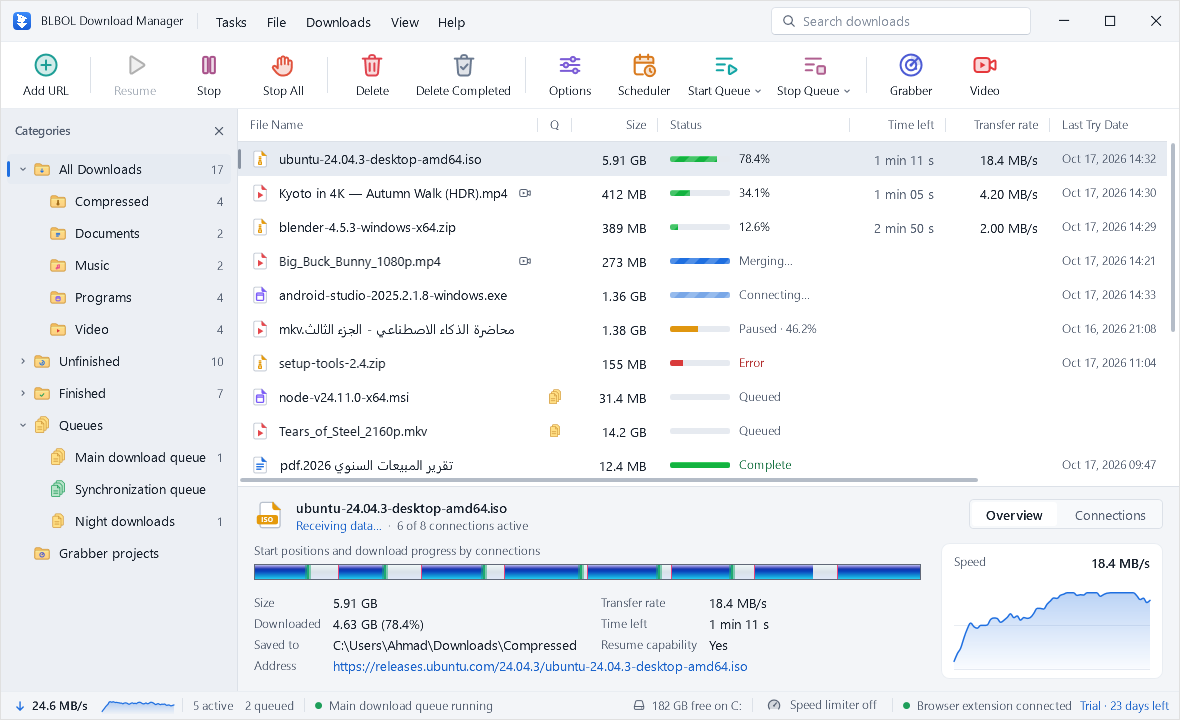
Dynamic segmentation: no slow finish
A naive splitter cuts the file into equal parts. The fast connections finish early and sit idle while the slowest one crawls through its last part, so the end of every download drags. BLBOL rebalances continuously: when a connection finishes its range, it takes over part of the range with the most time left, split at a point weighted by the speeds involved. Every connection keeps working until the very end.
No merge step at 99%
Some download managers save each connection to its own temporary file and join them when the last byte arrives. For a multi-gigabyte file that copy can take minutes, which is the familiar “stuck at 99%”. BLBOL reserves the final file on disk at the start and each connection writes directly into its own slice, so at 100% the file is complete.
How many connections should you use?
More is not always better. Eight is a good default for most servers and lines. Very fast lines and distant servers can benefit from 16 or more; some servers allow only a few connections per visitor and may slow you down or refuse extra ones. BLBOL's adaptive mode finds the right number for each server, and you can set a maximum in Options → Connection.
Other things that make a difference
- Use a cable when you can. Wi-Fi through walls loses speed and adds latency.
- Pause other big transfers. Cloud backups, game updates and video calls share the same line.
- Check your VPN. A VPN server far away, or a busy one, can become the bottleneck.
- Use the speed limiter instead of stopping. If downloads get in the way of a call, cap them for a while rather than cancelling.
Measure before you tune
Run the BLBOL speed test to see what your line delivers right now, then compare it with the transfer rate BLBOL shows in its status bar. If a download already runs close to your line speed, more connections will not help; the line itself is the limit.
When multiple connections don't help
- The server does not support ranged requests. The download still works, over one connection, and BLBOL shows Resume capability: No.
- The file is small. A few megabytes finish before extra connections are worth opening.
- Your own connection is the bottleneck, for example on a slow mobile network.
Ready to try it? Download BLBOL and use every feature free for 30 days.
Download free trial