Download accelerator & scheduler
Download accelerator, scheduler and more. Done properly.
A download accelerator with a careful engine, a download scheduler and the organising tools you know from classic download managers, plus first-class video downloads and an interface built for Windows 10 and 11.


Download engine
Download accelerator: faster downloads that finish cleanly
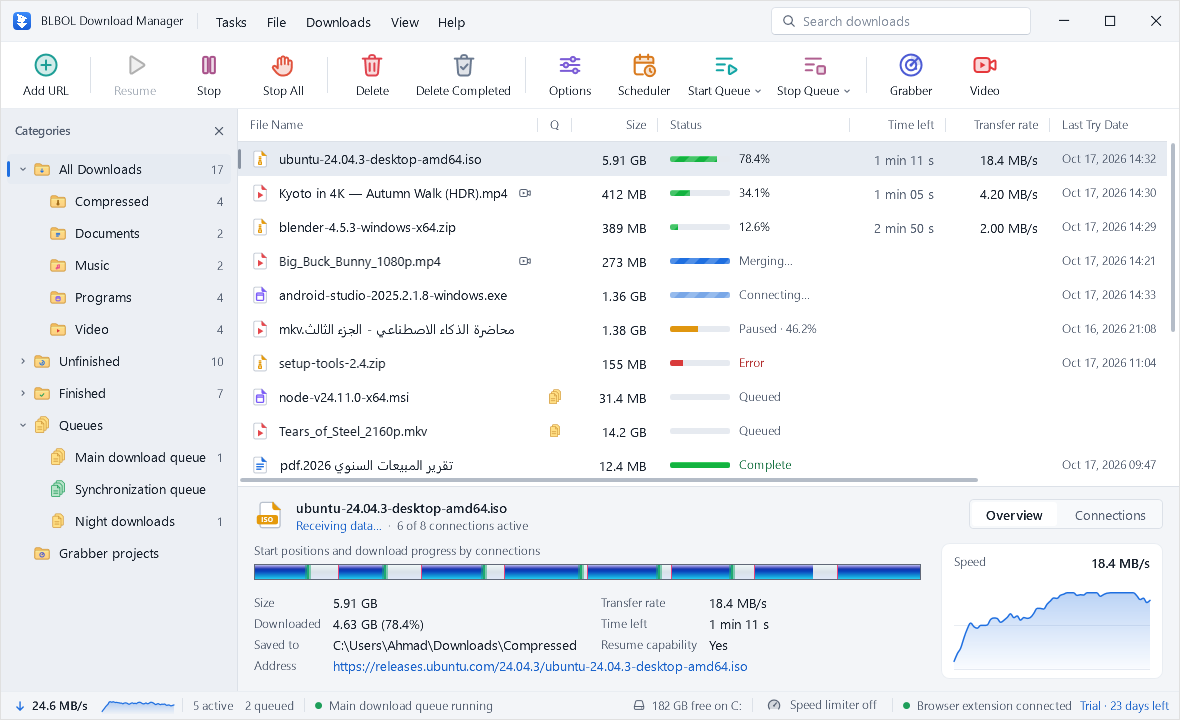
Up to 32 connections per file, split and rebalanced while the download runs, and written straight into the final file.
- Up to 32 connections
- Each file is split across parallel connections: up to 8 per file by default, adjustable up to 32, and BLBOL adds them only while they make the download faster.
- Dynamic segmentation
- A connection that finishes early takes over the part with the most time left, split at a speed-weighted point, so no single slow connection holds up the end.
- No merge step
- For regular downloads, the final file is reserved on disk at the start and every connection writes into its own range, so at 100% there is nothing to assemble. Video and audio streams are joined without re-encoding right after they finish.
- Resume downloads
- Progress is saved as you go. After a crash, a reboot or a lost connection, BLBOL can resume downloads where they stopped, when the server supports it. How resuming works.
- Automatic link refresh
- If a download address expires, BLBOL refreshes it automatically when the site allows, or in one click, and checks that it points to the same file before continuing.
- Smart retries
- Temporary errors are retried with growing pauses, and servers that limit connections automatically get fewer.
Organise
Categories, queues and a download scheduler
Downloads sort themselves, run in the order you choose and finish while you are away.
- Categories. Compressed, Documents, Music, Programs and Video, each with its own folder. Add your own with file-type rules.
- Queues. Line up downloads in queues and choose how many run at once.
- Scheduler. Start a queue at a set time, stop it at another, and let Windows sleep or shut down when everything is done.
- Speed limiter. Limit everything, one queue or a single download, so video calls and games stay smooth.
- Duplicates. Choose whether BLBOL asks, saves with a new name or replaces the existing file.
- Download later. Add files now with Download Later and start them whenever you like.
Capture
Get links in from anywhere
From the browser, the clipboard, a whole web page or a numbered series of files.

Browser extension
Automatic capture, right-click downloads and media detection in Chrome, Edge, Brave, Vivaldi and Opera. More about the extension.
Clipboard
Copy a link and press Ins: the address is already filled in. Turn on clipboard watching and BLBOL offers every link you copy.
Link Grabber
Scan a web page and the pages it links to, filter by file type, extension or pattern, and add the files you want to a queue.
Batch download
Paste a list of addresses or a pattern such as
photo[001-120].jpgto add a whole numbered series at once.Drag and drop
Drop links, or text that contains links, onto the BLBOL window to add them.
Sign-in and referrer
Downloads that need a user name, a password or a referrer can be added with them from the Add URL dialog.
Video & audio
YouTube and 1,000+ sites
A quality picker with real file sizes, whole playlists, audio-only downloads and subtitles.
 Download video
Night Train to Tromsø — 4K Journey
- 4320p60HDRMKV · AV14.12 GB
- 2160p60HDRMP4 · AV11.71 GB
- 1440p60MP4 · VP9812 MB
- 1080p60MP4 · H.264412 MB
- 720p60MP4 · H.264205 MB
- AudioMP3 · 320 kbps42.8 MB
Quality picker
Resolution, frame rate, HDR, codec and size for every format, with your preferred quality already selected.
Playlists and channels
Select videos from a playlist or channel and download them with one quality rule.
Audio only
MP3, M4A or Opus with cover art and tags.
Subtitles and chapters
Manual and automatic captions, embedded or saved as .srt, with chapter markers kept.
Social networks
Facebook, Instagram, TikTok, X, Reddit and many more. See every network.
Self-updating
The video components update automatically and roll back if a new version fails.
Interface
Built for Windows 10 and 11
The familiar layout, redrawn with care: crisp at any scale, light or dark, with 30 UI languages.

- Details pane. The segment map, a live speed graph and the key facts of the selected download.
- Status bar. Total speed, active and queued downloads, free disk space and extension status.
- Search. Find any download by name as you type.
- Download complete. A small notification with Open and Open folder, so the file is one click away.
- Dark mode. Light, dark or follow Windows, in every window and dialog.
- Arabic, right to left. A complete Arabic interface with a mirrored layout. Switch languages at any time.
Keep exploring
Your next download, at full speed.
Free for 30 days, with every feature. Windows 10 and 11, with 30 UI languages.